Your Shopify Operation Outgrew Google Sheets. Here's What Replaces It.
.png)
Table of contents
Why growing brands are replacing spreadsheets with Airtable for order routing, cross-team ops, and automation.
Let's get something out of the way: Google Sheets is not an operations platform.
It's a spreadsheet. A really good one. And for years, eCommerce brands have bent it into shapes it was never designed for. Order tracking. Inventory management. Fulfillment routing. Vendor communication logs. Purchase order approvals.
It works until it doesn't. And by the time it stops working, the damage is already done. Missed shipments. Stale data. Three people editing the same row at the same time with no idea who changed what. "Who updated this?" becomes the most common Slack message on the ops team.
The brands we work with that have made the switch to Airtable aren't doing it because it's trendy. They're doing it because their operations outgrew a flat grid. They needed something that could handle relational data, enforce structure, and plug directly into the automations that actually run their business.
This post breaks down why the shift is happening, what Airtable does that Sheets fundamentally can't, and how to think about the transition if you're running ops on spreadsheets today.
The Spreadsheet Ceiling Is Real
Google Sheets scales horizontally. You add more tabs, more columns, more formulas, more conditional formatting rules. Eventually you have a 47-tab workbook that takes 30 seconds to load and nobody fully understands except the person who built it. And that person left six months ago.
Here's where Sheets starts breaking down for growing brands:
- No relational data. You can't link an order to a customer to a product to a vendor in any meaningful way. You end up duplicating data across tabs and hoping VLOOKUPs hold together.
- No field types. Everything is text. A date field, a currency field, a dropdown, an attachment. All just text in a cell. That means no validation, no structure, and constant formatting errors.
- No granular permissions. You can share the whole sheet or not. You can't give your warehouse team access to fulfillment data while keeping margin info hidden from vendors.
- No native automation triggers. Sheets doesn't know when a row changes status. It doesn't fire events. So every automation built on top of Sheets requires polling, which means delays, missed updates, and unnecessary API calls.
None of these are bugs. They're design limitations. Sheets was built for calculations and quick collaboration, not for running multi-step operational workflows across teams.
What Airtable Actually Solves
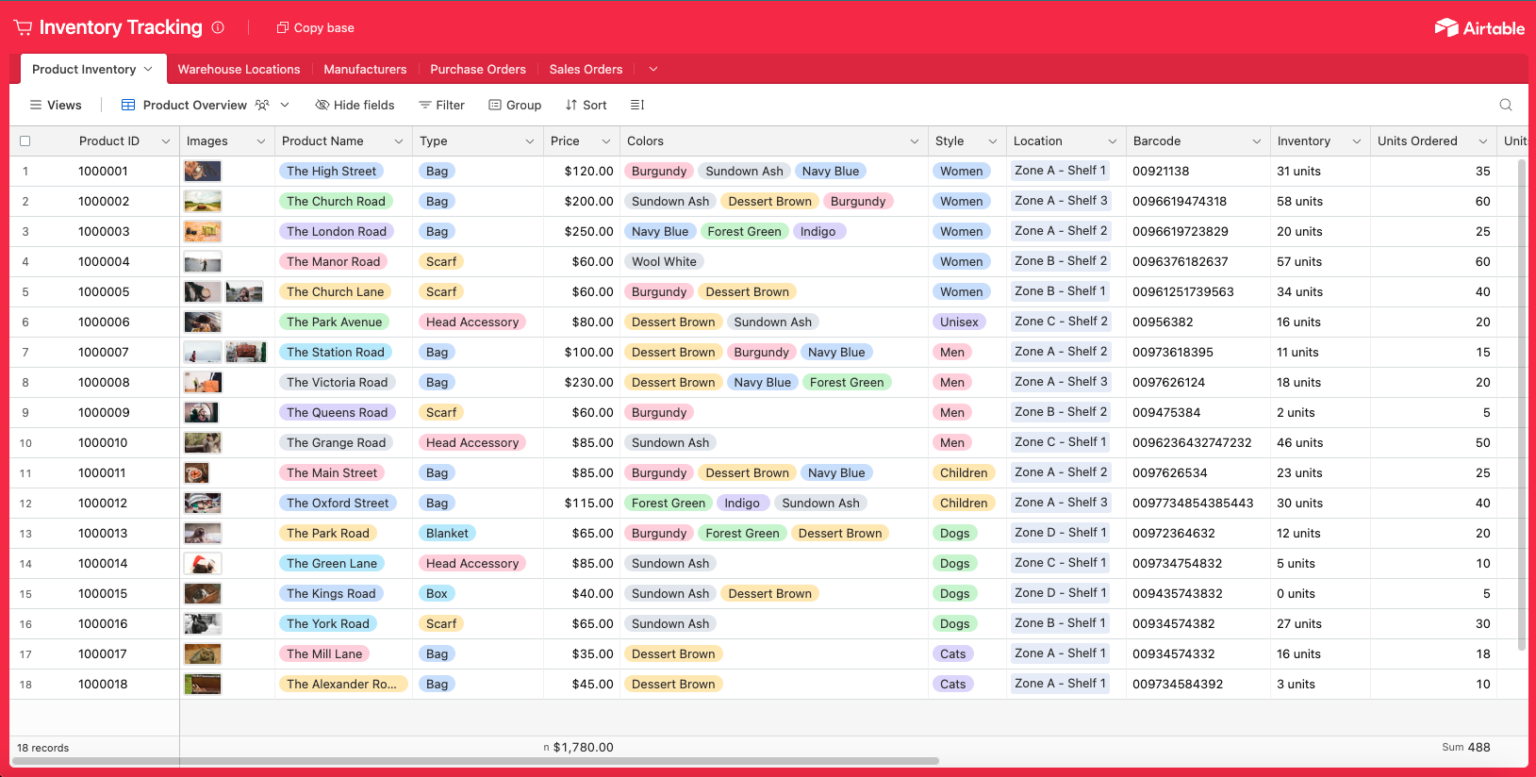
Airtable looks like a spreadsheet on the surface. That's intentional. It reduces the learning curve. But underneath, it's a relational database with views, permissions, and automation hooks that make it fundamentally different.
For ops and supply chain teams, three things matter:
1. Relational Structure
In Airtable, a single order record can link to a customer record, which links to a product record, which links to a vendor record. Change the vendor's lead time in one place, and every order tied to that vendor reflects it. No VLOOKUPs. No stale data. No manual syncing between tabs.
For brands managing hundreds or thousands of SKUs across multiple suppliers, this alone eliminates hours of weekly reconciliation work.
2. Views Without Chaos
One base. Multiple views. Your fulfillment team sees a Kanban board of orders by status. Your purchasing team sees a calendar of incoming POs by expected delivery date. Your CS team sees a filtered grid of orders flagged for issues. Everyone works from the same data but sees only what they need.
In Sheets, this requires separate tabs, separate copies, or an increasingly fragile web of filters. In Airtable, it's built in.
3. Automation-Ready Architecture
This is where it gets interesting for us. Airtable fires webhooks when records change. It has a native automation engine for simple triggers. And for anything more complex, it connects directly to tools like n8n, which is what we use to build production-grade workflows for brands.
That means you can set up a workflow where: a new order hits Shopify, syncs to Airtable, gets routed to the correct fulfillment center based on inventory levels and shipping zone, triggers a PO if stock is low, and notifies the ops team in Slack. All without anyone opening a spreadsheet.
Try doing that with Google Sheets. You'll spend more time maintaining the system than running your business.
Order Routing: The Use Case That Breaks Sheets First
If there's one workflow that exposes the limits of spreadsheets faster than anything else, it's order routing.
Brands with multiple warehouses, 3PLs, or fulfillment partners need to route orders based on a combination of factors: product availability, geographic proximity to the customer, shipping cost, and sometimes vendor-specific rules. In a spreadsheet, this means formulas layered on formulas, manual overrides that nobody documents, and a process that falls apart the moment you add a new warehouse or change a shipping threshold.
In Airtable, order routing becomes a structured workflow. Each order record is linked to inventory records, warehouse records, and shipping zone tables. Routing logic lives in automations, not in cell formulas. When the rules change, you update one field or one automation step. You don't rebuild a formula chain across five tabs.
We've built this for brands doing $2M to $30M in annual revenue, and the pattern is consistent: the moment order routing moves out of spreadsheets, fulfillment errors drop and the ops team stops spending half their day manually checking assignments.
Cross-Team Collaboration Without the Chaos
Here's a pattern we see constantly: the ops team manages orders in one Google Sheet. The purchasing team has a separate sheet for POs. The CS team has another for returns and exchanges. Marketing has one for product launch timelines. And the founder has a "master" sheet that tries to pull data from all of them but is always three days behind.
This isn't collaboration. It's controlled chaos with a shared Drive link.
Airtable solves this by giving each team their own view of shared data. The purchasing team doesn't need a separate spreadsheet. They get a filtered, sorted view of the same base the ops team uses. When a PO is received and inventory updates, the ops team sees it immediately in their fulfillment view. The CS team sees updated stock levels without asking anyone.
The unlock here isn't just efficiency. It's trust. When everyone works from the same source of truth, you stop having meetings to reconcile data. You stop sending "is this current?" messages. You just work.
The Automation Layer: Where Airtable Becomes Infrastructure
A database without automation is just organized storage. The real value of moving to Airtable is what it enables on top of the data.
At Streamline Connector, we build automation workflows in n8n that use Airtable as the operational backbone. Some examples:
- Shopify order comes in, syncs to Airtable, triggers routing logic, and pushes fulfillment instructions to the correct 3PL. No manual touch.
- Inventory drops below a threshold in Airtable, which triggers a PO draft, routes it for approval via Slack, and sends it to the vendor on approval.
- A product record is updated in Airtable (new image, description change, price adjustment), and n8n pushes that update to Shopify, Amazon, or wherever it needs to go.
- Daily ops summary pulls from Airtable views, compiles key metrics, and drops a formatted report in Slack or email every morning before the team logs in.
None of this is possible when your data lives in a Google Sheet. Not reliably. Not at scale. Sheets doesn't have the event-driven architecture that automation tools need to work in real time. You're stuck polling for changes, which means delays, missed triggers, and brittle workflows.
Airtable's webhook and API support means your automations respond to changes the moment they happen. That's the difference between a system that runs your operations and a spreadsheet someone has to babysit.
"But My Team Knows Sheets"
This is the most common objection, and it's valid. Switching tools always has a learning curve.
Here's what we've found: the teams that struggle most with Airtable are the ones that try to use it exactly like Sheets. They create one massive table with 40 columns instead of building a relational structure. They ignore views. They skip field types.
The teams that succeed treat it as an upgrade, not a replacement. They start with one use case, usually product catalog management or order tracking, build it out properly, and let the rest of the team see the difference. Adoption follows naturally because the experience is just better.
Airtable's interface is familiar enough that most ops teams are comfortable within a week. The Kanban views, the calendar views, the gallery views, these aren't abstract database concepts. They're visual tools that people immediately understand.
The bigger risk isn't the learning curve. It's staying on Sheets until the cost of manual work, missed data, and broken formulas exceeds what the switch would have cost six months ago.
How to Think About the Transition
You don't need to move everything at once. In fact, you shouldn't. Here's the approach that works:
- Start with one high-pain workflow. Order routing, product catalog management, or inventory tracking. Pick the one that causes the most Slack messages and manual work.
- Build the Airtable base with proper relational structure from day one. Linked records, field types, views for each team. Don't just copy your spreadsheet into Airtable. Redesign it.
- Layer automation on top once the data is clean. Connect Airtable to your Shopify store, your 3PL, your communication tools. This is where the ROI accelerates.
- Migrate the next workflow once the first one is stable and the team sees the value.
Most brands we work with fully transition their core ops from Sheets to Airtable within 60 to 90 days. Not because the tool is complicated, but because doing it right means being deliberate about structure and automation.
The Bottom Line
Google Sheets is a great tool for what it was designed to do: quick calculations, lightweight collaboration, and ad hoc analysis. It's a terrible tool for running eCommerce operations at scale.
Airtable gives ops and supply chain teams what they actually need: structured data, relational logic, granular permissions, and an architecture that automation tools can actually work with. It's not a flashy upgrade. It's a foundational one.
If your team is spending more time maintaining spreadsheets than making decisions, the spreadsheet isn't the tool anymore. It's the bottleneck.
Streamline Connector builds automation workflows for eCommerce brands using n8n and Airtable. We're certified n8n agency partners in the US. If your ops are still running on spreadsheets and duct tape, let's talk.
.png)